dbt Core x Airflow parameterised DAG
Introduction
The need for custom jobs to be executed in production is quite obvious… I hope 😉
- Quick fix deployment requiring an urgent reload.
- Full refresh of your incremental pipelines.
- Failure in the ETL execution pipeline.
And many more to name. Let’s not make it longer than necessary and jump into the interesting bit.
Prerequisites
- You obviously need an Airflow deployment.
- You need to have a way to handle your dbt commands when they are passed to Airflow — this is out of the scope for this article so I am taking an assumption you have this ready and can simply provide Airflow with dbt commands which it will execute.
- Connections, authorisations etc. — all of that is standard for any production job so I will also not be describing it here and assuming you have that ready and set up.
Implementation
Providing parameters
In your DAG definition, you want to add parameters to be filled in. The way I structure it is that each of the flags dbt accepts (eg. — full-refresh) is provided as a separate parameter. This corresponds to the backend definition of dbt Core commands which appends to the statement any flag or variable parsed the same way as you would write it locally on your machine.
Please see below example of the params parameter:
params={
    "dbt_command": Param(
        "run",
        type="string",
        minLength=1,
        description="The dbt command to run",
    ),
    "vars": Param(None, type=["null", "string"]),
    "exclude": Param(None, type=["null", "string"]),
    "select": Param(None, type=["string"], minLength=1),
    "warn_error": Param(False, type="boolean"),
    "fail_fast": Param(True, type="boolean"),
    "full_refresh": Param(False, type="boolean"),
},
I have chosen the most important flags and options, but you are free to expand that list as you wish.
💡 Tips:
- Set carefully the default values, eg. the — full-refresh flag is set to False by default to avoid people triggering the full refresh by accident.
- Set the (Airflow parameter) render_template_as_native_obj to True.
- The schedule of your DAG should be set to None — this is because the purpose of this DAG is to be able to run custom jobs as you wish in production.
Accessing parameters
In order to access the parameters you provided to your DAG it is nothing simpler than to provide it in op_kwargs to your operator (assuming it is a PythonOperator for dbt Core). Please see below an example:
dbt_execution_task = PythonOperator(
    task_id="run_custom_dbt_command",
    python_callable=<your_python_callable>,
    provide_context=True,
    op_kwargs={
        "command": "{{ params.dbt_command }}",
        "vars": "{{ params.vars }}",
        "exclude": "{{ params.exclude }}",
        "select": "{{ params.select }}",
        "output_encoding": "utf-8",
        "warn_error": "{{ params.warn_error }}",
        "fail_fast": "{{ params.fail_fast }}",
        "full_refresh": "{{ params.full_refresh }}",
    },
)
[Optional] Extra safety check to protect from full refreshes
Some of my colleagues believe it is enough to set — full-refresh flag to False. I believe that if we have people less experienced who access that DAG — it might not be enough. Therefore I came up with a hacky way to introduce one extra safety step to ensure each full refresh is actually desired. Use it if you wish, skip it if you don’t.
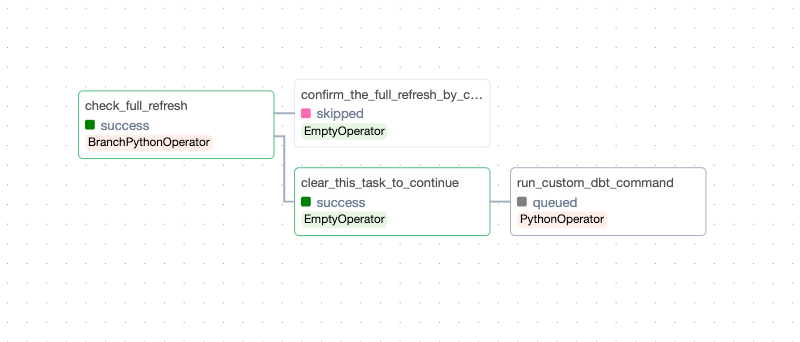
The whole premise is about introducing a branch operator, where we check first whether or not the triggered run is full refresh.
- If it is not — we proceed as normal.
- If it is — you need to clear one extra task in Airflow to ensure it executes.
This is because this implementation stands against the general purpose of Airflow — where we should use it as automated orchestrator. This extra feature provides more of a control panel for people to orchestrate, this is why the hacky solution is needed and Airflow does not support this out of the box.
First you need a simple python function to check for the full refresh flag:
def check_full_refresh(parameters):
    if parameters["full_refresh"]:
        return "confirm_the_full_refresh_by_clearing_next_task"
    return "clear_this_task_to_continue"
The next step is to add the branch operator and two more extra dummy tasks looking like this:
check_full_refresh_task = BranchPythonOperator(
    task_id="check_full_refresh",
    python_callable=check_full_refresh,
    op_args=["{{ params }}"],
    provide_context=True,
)

continue_after_resolution = EmptyOperator(
    task_id="clear_this_task_to_continue"
)

handle_full_refresh_task = EmptyOperator(
    task_id="confirm_the_full_refresh_by_clearing_next_task"
)
Then all what’s left is to set up the proper order of the task execution, such that we can achieve:
Either direct execution for NON full refresh
Or extra safety check FOR a full refresh
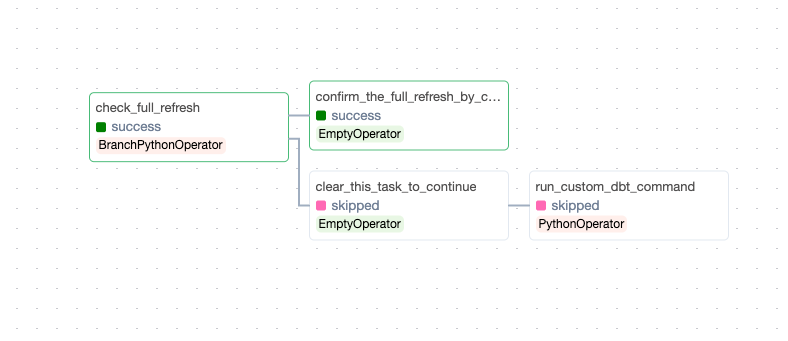
And the setup to achieve this presents itself as follows:
(
    check_full_refresh_task
    >> [
        handle_full_refresh_task,
        continue_after_resolution,
    ]
)

continue_after_resolution >> run_dbt
Summary
This way each time a full refresh is triggered we have to clear one task additionally to make sure that the full refresh is going to go ahead. This is not the prettiest implementation of such a safety feature but one that works for Airflow and is simple enough for experienced people to implement and use yet hard enough for less experienced people to ensure that they do not trigger huge full refreshes by accident in your production environment.
Contact Me
Thanks for reading. Are you liking the information received but lacking time or skillset to get your analytics engineering sorted? Check out my contact details.
dbt Airflow parameterised DAG was originally published in Lortech Solutions Blog on Medium, where people are continuing the conversation by highlighting and responding to this story.