The Task
Client had a simple requirement: ingest Salesforce data into dbt. We asked how many objects. They sent a list of 20+.
We knew right away we didn’t want to spend the whole day writing repetitive SQL models, copying field names, and maintaining YAML files for each one. Every time Salesforce changed a field, we’d have to fix everything manually. Not an option.
The Approach
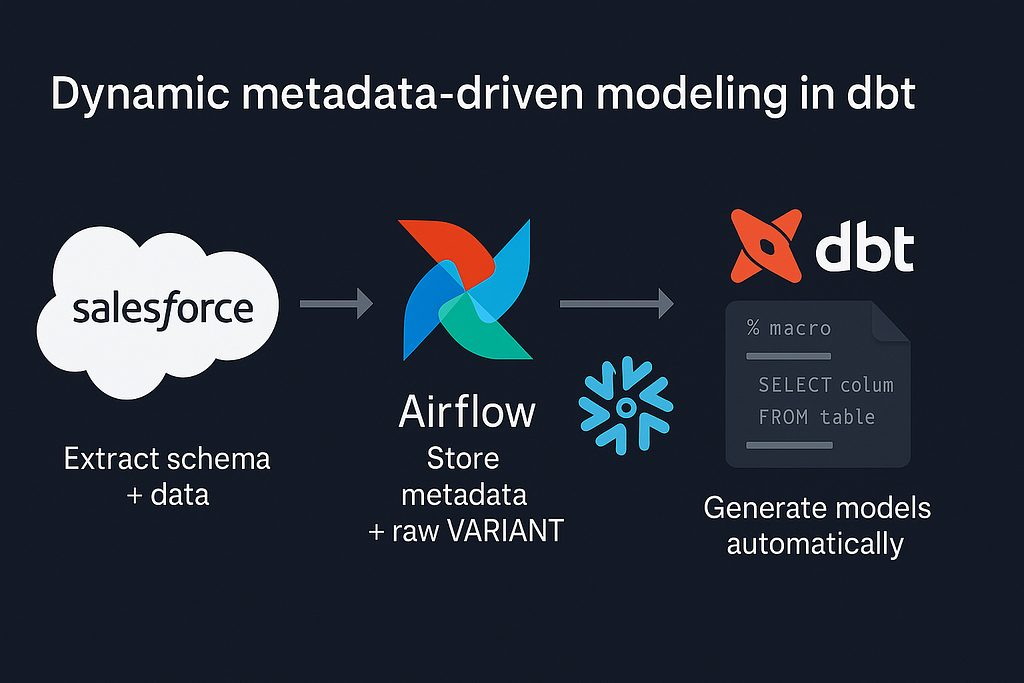
We use Airflow as orchestrator, so we started by adding a DAG responsible for schema extraction and data sync. The goal was to fetch Salesforce metadata dynamically and push it into Snowflake for dbt to consume.
Step 1 — Fetching Salesforce Schema
Salesforce provides an API endpoint that describes object metadata:
GET /services/data/v59.0/sobjects/{OBJECT_NAME}/describe/Response snippet:
{
  "fields": [
    {"name": "Id", "type": "id"},
    {"name": "Name", "type": "string"},
    {"name": "OwnerId", "type": "reference"},
    {"name": "CreatedDate", "type": "datetime"}
  ]
}
In Airflow, we wrapped it as a simple Python task: every DAG run iterates through the list of objects and refreshes metadata for each of the one from predefined list. Everything is then saved into sf_metadata_fields table in Snowflake database.
Step 2— Storing Raw Objects
Each Salesforce object was also stored separately in Snowflake. We didn’t want to merge all data into a single dataset, because every object had a completely different structure and it was easier to find them in snowflake this way.
During ingestion, we flattened the raw API response and stored it in per-object tables under raw_data schema. Each record contained a single column record VARIANT, holding the entire JSON payload from Salesforce:
create or replace table raw_data.account as
select
    metadata$filename as file_name,
    metadata$file_row_number as row_number,
    to_variant($1) as record,
    current_timestamp() as _load_time
from @salesforce_stage/account/*.json.gz;
That approach allowed us to keep ingestion generic — one ingestion operator, multiple objects — without defining column mappings upfront. dbt later read metadata from sf_meta_fields and casted record fields dynamically inside generated staging models.
Step 3— Dynamic dbt Model Generation
Once schema metadata is in Snowflake, dbt macros take over. We wrote a macro that generates staging models dynamically. We start with fetching metadata from the Snowflake table using run_query() inside a helper macro:
{% macro sf_get_object_fields_with_types(object_name) %} -- salesforce object name
    {% set query %}
        select field_name, field_type
        from {{ source('salesforce', 'sf_meta_fields') }}
        where object_name = '{{ object_name }}'
    {% endset %}
    {% set results = run_query(query) %} -- run_query
    {% if execute %} -- ensure macro only runs in "execute" mode (not during dbt compile dry-run)
        {% set fields = [] %} -- iterate through each row returned by run_query()
        {% for row in results.rows %}
            -- append each (field_name, field_type) pair to the fields list
            {% do fields.append({
                "field_name": row[0],
                "field_type": row[1]
            }) %}
        {% endfor %}
        -- return the full list of dictionaries to the parent macro
        {% do return(fields) %}
    {% endif %}
{% endmacro %}
This macro runs at compile time — run_query() executes a SQL statement against Snowflake during dbt compilation, returning the list of columns and their types from our metadata table.
That result is then consumed by the generator macro to produce a fully typed model automatically:
{% macro generate_stg_model(object_name) %}
  {% set fields = sf_get_object_fields_with_types(object_name) %}
  select
    {% for f in fields %}
      record:"{{ f.field_name }}"::{{ f.field_type }} as {{ f.field_name }}{% if not loop.last %},{% endif %}
    {% endfor %}
  from {{ source('salesforce', object_name) }}
{% endmacro %}
That’s it — dbt executes run_query() inside the macro at compile time, pulling metadata directly from Snowflake and generating a full SQL model dynamically.
Example command:
{{ generate_stg_model("Account") }}which outputs:
select
  record:"Id"::varchar as Id,
  record:"Name"::varchar as Name,
  record:"OwnerId"::varchar as OwnerId,
  record:"CreatedDate"::timestamp_ntz as CreatedDate,
  ...
from {{ source('salesforce', 'Account') }}
Step 4— Generating YAML Automatically
We later automated schema documentation using dbt-codegen:
dbt run-operation generate_model_yaml --args '{"model_name": "stg_salesforce_account"}'and merged field descriptions from sf_meta_fields to enrich the YAMLs with Salesforce field metadata.
Keep in mind you have to add dbt-codegen to packages.yml and use dbt deps before using this command, otherwise dbt won’t recognize the macro.
The Result
- 20+ models built and documented automatically
- Schema drift handled automatically on next Airflow run
- No manual typing, no copy-paste errors, no maintenance overhead
Lesson Learned
If your task involves modelling data from external CRMs like Salesforce, HubSpot, or Dynamics — always check for “describe” or metadata endpoints. They’re not popular, but they can turn a full day of manual work into a fully automated workflow that self-updates and self-documents.
Joachim Hodana - Software & Data Engineer
Automating Salesforce → dbt Models: Dynamic Metadata-Driven Modeling was originally published in Lortech Solutions Blog on Medium, where people are continuing the conversation by highlighting and responding to this story.